
Fans and Fanfic Studies and Research Group
USER GUIDE: AO3
(ARCHIVE OF OUR OWN)
Back in the early days of NEPF², we noticed that the number of fanfics produced in Portuguese on the Archive Of Our Own (AO3) platform had been increasing with the decline of functional Brazilian fanfiction platforms. With this in mind, and the relevance of AO3 as the largest fanfic archive in the world, we believe that it is an extremely important site for fandom culture and history. The decision to use AO3 as the main publishing platform for fanfics produced in NEPF² led us to think that many colleagues in the academic world are new to the field and have never had contact with a site like this. Therefore, we created a guide explaining all the main tools of the AO3 platform, with descriptive images and available in Portuguese and English. We hope it will be useful in your fanfiction journey.
This text was written by Eloisa Coelho Sabino, Maria Clara Carreiro e Julia Abrahão.
And remember! AO3 can be used without an account. If that’s the case, you can skip the “How to create an account” and “Understanding your profile” sessions.
Archive of Our Own, better known as AO3, is a nonprofit organization whose goal is to host and protect transformative works, for example, fanfic. The website was invented in 2007 when fans had had enough of the censorship from other platforms and from their works being constantly deleted from said websites, and due to this, they created a safe haven for all those who wanted to write and post their works. Thus, completing fifteen years in 2022 and achieving the milestone of 10 million fanfictions publishing in its platform, AO3 established itself as one of the biggest sites focused on fics in the world, and it continues to be an important place for all those who want to keep this art alive and thriving.

How to create an account:
To fully enjoy all the possibilities and features that Archive of Our Own offers, you must first create an account on the website. Only then will you be able to, for example, follow your favorite author and see all the new content they post, create collections with your favorite fanfictions, view works hidden from non-members, and much more. Pay attention to this tutorial and see how easy it is to create your AO3 profile!

The first step is to access the website , then click the "Get Invited!" button. After doing so, the second step is to read the website's terms and conditions. Remember that by submitting your email address to create your profile, you are confirming that you are of legal age of consent in your country. On its website, AO3 requires its users to be at least 13 years old; however, in Brazil, the legal age is 14. It's important to remember that this notice exists to protect you, as some content in the Archive is not suitable for all ages. Stay safe! After that, if you are equal to or older than the legal age of consent in your country, all that remains is to enter your email address in the "Request an invitation" field.
After completing the second step, click “Add me to the list” and wait for an invitation to arrive in your email informing you that you can now create your profile on the website.
Note that this may take a few days, but you can always check your position on the AO3 invitation waiting list by clicking "check your position on the waiting list." Clicking this button will take you to the invitation status checker. Simply enter the email address you used to request account creation, and it will immediately tell you your position in the queue and an estimated time for your invitation to arrive.
Once you open your email inbox and see a message from AO3 about creating your account, simply click on it, choose a username and password. You'll have successfully created an account on the website and are ready to use all the site's features and read as many fanfics as you like.
Understand the functions of your profile:
After logging into your account, you will be taken to your profile dashboard, where you can view and edit anything about your personal account.

By clicking on “profile”, you can:
-
Post new works (by clicking on “post new”);
-
Edit your publications (by clicking on “edit works”);
-
edit your profile, adding the place where you are, your date of birth and a short biography about who you are - it is worth emphasizing the importance of maintaining your security and avoiding as much as possible disclosing sensitive information about yourself on the internet, protect yourself above all.
Preferences: pressing the “preferences” button takes you to the “manage my pseuds” options, where you can create pseudonyms for publishing and reading fanfics - this function can be used if you have several fandoms and don't want to mix their fanfics in one profile;
Blocked users: this is where you can block a user on the site, so that they can no longer comment on your works or reply to your comments on other works. However, this doesn't prevent you from viewing the fanfics they've written, it doesn't delete old comments they may have made on an old fic of yours (you have to do this manually) and it doesn't hide any comments they may have made on another fic. Always take care;
Orphan my works: be very careful with this option. On AO3, to prevent works from being lost when the author no longer feels comfortable with them, the site has created a special account called ‘orphan_account’. This is where all the works of all the writers who one day decided to leave their fics “orphaned” are stored, i.e. they give up control of the text, can no longer edit or delete it, and it becomes a work without a creator. This is an important attitude to keep the community alive, even if the author no longer likes or has an affinity with the fanfic. However, this is irreversible, so think carefully before you do it.
Change my user name: this is where you can change your user name, but remember that you can only do this once every seven days.
Skins: by clicking on “skins” you can change the appearance of your viewer for reading or writing fics. An example of this is the ‘skin’ that turns your screen black, thus making viewing and reading more comfortable. Here's a tutorial on how to add it.
Click on “skins”. Then go to “public site skin”. Find the second option called “Reversi”. Once you've found it, click on “use”. Your browser will immediately apply it for use.
Under “works” you can view all the works you have already published.

Drafts: Drafts are where your fanfic drafts are stored. However, you should be aware that they will be immediately deleted by the site if they are not posted within a month of their creation.
Series: by clicking on “series” you will be able to view all the series, such as sagas, of fanfics created by you.
Bookmarks: using the “bookmarks” button you can 'favorite' fanfics, they will be saved on your profile and can be easily accessed at any time.

Collection: In "collection," after creating bookmarks, you can sort your favorite fanfics by any category you want. Your imagination is the limit.
Inbox: using the “inbox” button, you can view any notifications, such as comment replies, that you have.
Statistics: the “statistics” tab is used to see how your fanfic is performing in numbers, with statistics.
History: This tab shows all your history of fanfictions you've read on the site.

Subscriptions: The "subscriptions" button is crucial because it lets you see which works or favorite authors you've opted into receiving special notifications from. Whether it's a fanfic you want to always receive updates about, or an author you love everything they write and want to be notified of any future work they post. In the first case, simply click "subscribe" as soon as you click on a fic, and in the second case, when accessing the author's profile, click the "subscribe" button that appears.
Sign-ups: In “sign-ups” you can see which challenges, writing challenges, you are signed up for and follow them closely.
Assignments: in the “assignments” button you will find the 'prompts', writing ideas, that you have decided to do.
Claims: under “claims” you will find all the prompts for a gift exchange (an event where you can gift someone with fanfic) that you are registered for.

Related works: The "related works" tab will contain works inspired by one of your fanfics. Therefore, if someone read and liked a specific work of yours enough to get the idea to write an original work, they'll credit your fic as inspiration.
Gifts: and finally, the “gifts” tab, where all the fanfics that were given to you as gifts are stored.
So, after learning how to create and use your newest AO3 account, don't forget to use this incredible website carefully and have a lot of fun reading all the works published there.
How to find a fanfic on Search:

-
SEARCH BAR:
To search for fanfics, type the character's name in the search field, such as "Harry Potter", "Annabeth Chase", or the franchise, such as "Marvel" or "The Lord of the Rings". If you want to read about a ship (term for a couple), type the character's names with a / between them, e.g.: percy jackson/annabeth chase.
Tip: You'll find more results if you search for the franchise names in English, such as "Lord of the Rings" instead of "Senhor dos Anéis" or "Heroes of Olympus" instead of "Heróis do Olímpo".
Another way to find more fanfics is to go to the profile of a fanfic author you like and search for more fanfics written by that person or access that author's bookmarks.
To further filter your search and find more specific fanfics, click the “edit your search” button on the right side of the screen.
-
WORK INFO/MORE OPTIONS:
The work info field, also called more options, has even more options to make the ao3 experience more personalized.

Any Field: searches for the term entered throughout the body of the fanfic, in all fanfics that fit the search criteria.
Title: Allows you to find a specific fanfic by typing the title in this field. The search results will then contain the desired title.
Author/Artist: This field allows you to find the work of a specific fanfic writer or artist by typing the creator's name. This can be found next to the fanfic title on the search home page or below the title when opening the fanfic page.

Date: allows you to search for fanfics using a specific date or amount of time. You can search, for example, for fanfics posted a few days ago by typing “x days” where the ‘x’ is a number, and the same is possible for weeks (“x weeks”), months (“x months”) and years (“x years”).
Completion status: this field allows you to define the status of fanfics in terms of their completion. It has three options:
-
All works: selects all fanfics from the chosen filters regardless of their completion status, i.e. whether they have already been completed or are still being updated.
-
Complete works only: selects only completed fanfics. You can check this status in the information bar of each fanfic.
-
Works in progress only: selects only fanfics that are still in progress, i.e. not finished.
Crossovers: a crossover is a type of fanfic that includes more than one franchise at the same time, and the characters from these franchises, who don't normally interact in the same universe, start to interact in crossover fanfics. This field has three options:
-
Include crossovers: the search results include fanfics with crossovers, but do not exclusively show fanfics with this characteristic.
-
Exclude crossovers: by checking this option, the results shown will be exclusively fanfics without crossovers.
-
Only crossovers: the fanfics will be exclusively crossovers.
Single chapters: by checking the single chapter option, the site will only show results for fanfics that only have one chapter.
Word count: the word count field allows you to select the length of the fanfics. To use this filter, type in the number of words you want to find, such as “10000” will result in fanfics with ten thousand words; “10000-50000” will result in fanfics between ten thousand and fifty thousand words; “>10000” will result in fanfics with more than ten thousand words; “<10000” will result in fanfics with less than ten thousand words. When using the filter, type the number without the quotation marks. The number ten thousand was only used as an example.
Language: by choosing the language of your choice, the site will only show fanfics written or translated in the selected language.
Search:
When you scroll down to the bottom of the “edit your search” page, you will find the “search” area. This area contains the options “sort by” and “sort direction”.
By clicking on the “drop down” list of the “sort by” topic, you will find the following options:
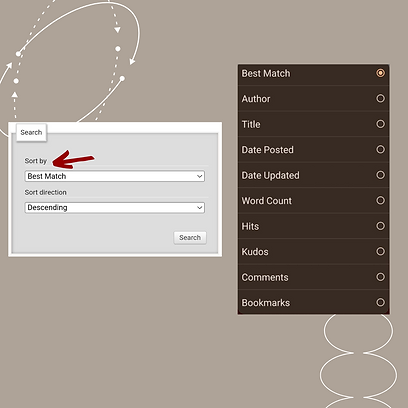
Best match: organizes the search results according to the characteristics selected, offering the results with the greatest number of characteristics.
Author: organizes the search results with the authors in alphabetical order
Title: organizes the search results with the search titles in alphabetical order.
Date posted: organizes the search results according to the date the fanfic was posted.
Date updated: organizes the search results according to the last date the fanfic was updated.
Word count: organizes the search results according to the count (quantity, number) of words in the fanfic.
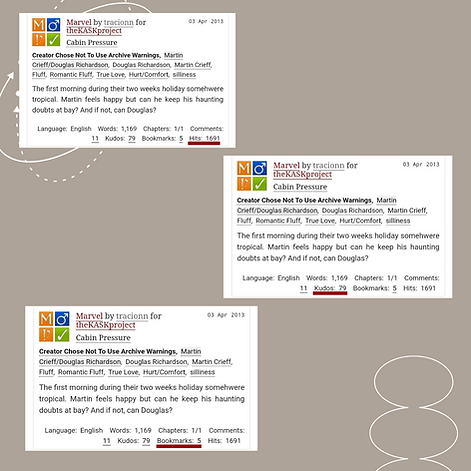
Hits: hits represent how many times a fanfic has been accessed. By selecting this option in the drop down, the search organizes the results according to the hit count. The number of hits can be found in the bottom right-hand corner of the fanfic information bar.
Kudos: the equivalent of a “like” on social media. Kudos can only be left once per work. By selecting this option, the search organizes the results according to the number of kudos left on the fanfic.
Comments: organizes the search results according to the number of comments left on the fanfic.
Bookmarks: bookmarks allow you to save fanfics to your profile so that you can find them more easily later. When you select this option, the search organizes the results according to the number of bookmarks (how many times the fanfic has been saved by other people).
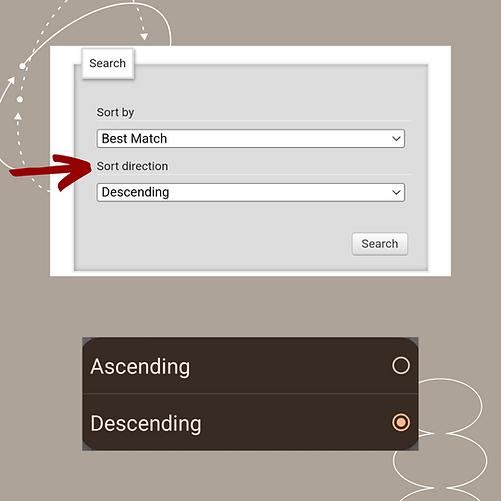
In the sort direction field, the drop-down menu provides two options:
-
Ascending: organizes the search according to the previously mentioned filters from the smallest number to the largest or in alphabetical order from AZ.
-
Descending: organizes the search from largest number to smallest or in alphabetical order from ZA
How to use the results page filtering system:
On Archive of Our Own, you can include or exclude tags from your results pages through a filtering system that appears when you click the "filters" button. If you click on a character's tag, all fanfics featuring that character will appear on a results page. Using the filters, you can narrow down the page to only fanfics that, for example, are tagged with an age range of eighteen or older. In the "filters" section, if you exclude a character's tag, only fanfics without that character will appear. Let's go through each tag category and what they mean; they are the same for exclusion and inclusion.

Rating: The age rating is a fairly straightforward category; it's simply an estimate of the appropriate age for reading the fic's content. It's important to note that ratings vary from author to author, so always pay attention to tags and trigger warnings. The rating is the first square in the top left corner of each fanfic, and each rating has a different color. The author has the option to not rate the fic, leaving the square blank. You can exclude multiple ratings, but include only one.


Warnings: Warnings are trigger warnings that indicate that the fic contains a specific type of content. Warnings can include a series of tags defined by AO3; warning symbols appear in the square in the lower left corner. They also appear just before each fic's tags, written in bold. You can include and exclude as many warnings as you like.


Categories: These are categories that indicate what type of relationship, if any, is being portrayed in the fic. The categories are the top-right square of each fic.


Fandoms: In fandoms, you can find the ten most frequently used fandom tags in this search. Additionally, there's the specific number of fanfics that contain that tag. Fandom, in this sense, refers to the work the fanfic is inspired by, so the Harry Potter books would have a different fandom than the Harry Potter films. If an author chooses, they can tag multiple fandoms; this is often done in crossovers. If the name of a fandom or author is followed by "all media types," the fic was inspired by all the canonical works of that fandom or author. Fandoms appear just below the fic's name and author, above the tags, and next to the symbol table. You can include and exclude as many fandoms as you like.


Characters: Characters is also quite simple. In this category, the ten most commonly used characters in that search will be listed, with the exact number next to it. Characters are listed after relationships within tags. If a character has multiple names, there's usually a primary one used, and if another is used, it will take you to the primary page. However, there are times when the names are considered separate tags and don't represent the same thing. You can exclude and include as many characters as you like.
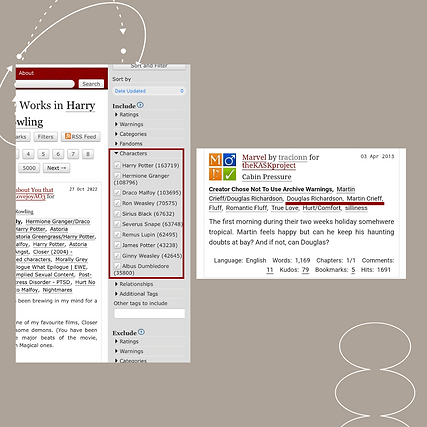
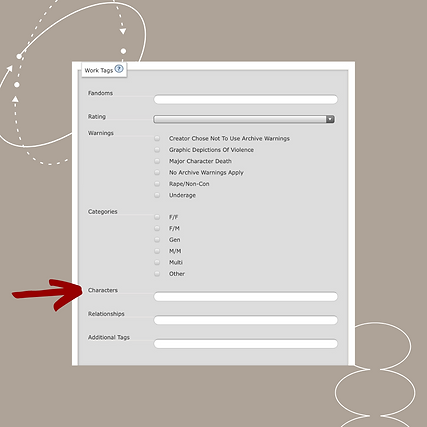
Relationships: In this category, the 10 most frequently used relationships are listed. If the relationship is shown with a / between the characters, it is a romantic relationship; if the relationship is shown with an & between the characters, it is a platonic relationship. This is not a rule, but it is worth mentioning. Relationships are highlighted in gray after the warnings in all fanfics. You can include and exclude as many relationships as you wish.


Additional tags: Under additional tags, the ten most commonly used tags that don't fall into one of the above categories will be listed. You can include and exclude as many additional tags as you like. They appear in the fic listed after relationships and characters.


This concludes our guide. Do you have any questions? Go to the "Contacts" tab and send us an email. Suggestions are also welcome! Don't forget to share our guide with anyone still having trouble with AO3.
© 2025 - Núcleo de Estudos e Pesquisas de Fãs e Fanfic (NEPF²).